Showing posts with label y. Show all posts

Assaulter Unlimit GALAXY Y

Kali ini saya mau share game  Assaulter yang versi Unlimit atau versi berbayar atau full version. Assaulter merupakan game arcade & action, kalau menurut saya game tersebut mirip metal slug.
Download Links:
- Link 1 Allert Terrorist Apk
- Link 2 Allert Terrorist Apk
 
Langkah-Langkahnya:
1. Just install Apk.
2. Play Allert Terrorist.
3. Selamat mencoba, Good Luck.
Screenshot:


Catatan: Assaulter ini sudah saya test di Galaxy Y GT-S5360, work 100%...
Read More..

Real Football 2011 GALAXY Y

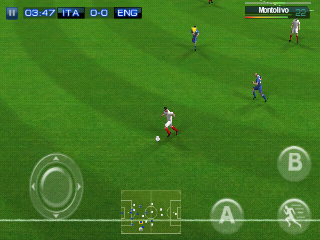
Alternatif FIFA dan Pro Evolution Soccer, Yups benar Real Football 2011, tidak perlu basa-basi langsung saya share gamenya. Sudah ditest di Galaxy Y GT-S5360 berjalan lancar.
Kebutuhan:
1. HH sudah di root, jika belum, Click Here.
2. HH sudah terinstall Chainfire 3D, jika belum, Click Here.

Download Links:
Mediafire:
Real Football 2011 Apk
Real Football 2011 Data Part 1
Real Football 2011 Data Part 2
Real Football 2011 Data Part 3 

Zippyshare:
Real Football 2011 Apk
Real Football 2011 Data Part 1
Real Football 2011 Data Part 2
Real Football 2011 Data Part 3
      
Langkah-langkahnya:
1. Install Apk.
2. Extract & Copy data ke sdcard/gameloft/games/here.
3. Buka Chainfire 3D, Plugins "Quallqom" dan tick "Reduce texture quality".
4. Play Real Football 2011.
5. Selamat mencoba, Good Luck...

Screenshot:


Catatan: Real Football 2011 ini sudah saya test di Galaxy Y GT-S5360, work 100%...
Read More..

INSTALL CWM on Galaxy Y Root Required

  Install Clockworkmod on Galaxy Y :               

Introduction :


Clockworkmod is a tool which is necessary for backing up your android smartphone.It is somewhat like  backing up your current settings , apps , and firmware which you could restore later..It is also necessary if you want to install custom ROMs on your phone.


ClockWorkMod Recovery, also known as CWM Recovery is a software or option used for replacing the default recovery console of Android smartphones or for rooting purpose. 


Steps to install CWM in Samsung galaxy y :


First Of all ensure that your phone is rooted and you have the super user access of your phone....
for the details of rooting follow this link


Now follow the below procedures ...
  • Install the given CWM_PACKAGE file ......   Download link 1....  ---Link 2---- ---Link 3---- 
    +++++++LIKED THIS POST ++++++ CLICK HERE and SKIP AD TO SUPPORT
  • Place the downloaded zip (link 2 contains piz format so rename it as .zip extension ) folder to your phones Sd Card ... (Remember put this to your root of sdcard ie  (sdcard / ) not in any folder 
  • Turn Off Your Phone
  • Press and Hold Home + Volume Up + Power key for few seconds until you see the Samsung Logo on the screen
  • Now you will see the phone is in default recovery console. 
  • Select the option ‘Install from SD Card’ using your Volume keys to scroll and press Home key to select. 
  • Now select ClockWorkMod Recovery named (CWM_Package) and press home key to select. 
  • Within 2 seconds your phone will be in ClockWorkMod Recovery.
    Read More..